GOV.UK Web log data - Content Traffic
This documentation provides an overview of the content traffic branch of the Dataform workflow for processing Fastly web log data. The content traffic workflow is designed to process and analyse web log data to provide insights into user interactions with GOV.UK content. For more information on the bot detection workflow, see GOV.UK Web log data - Bot detection.
Dataform workflow
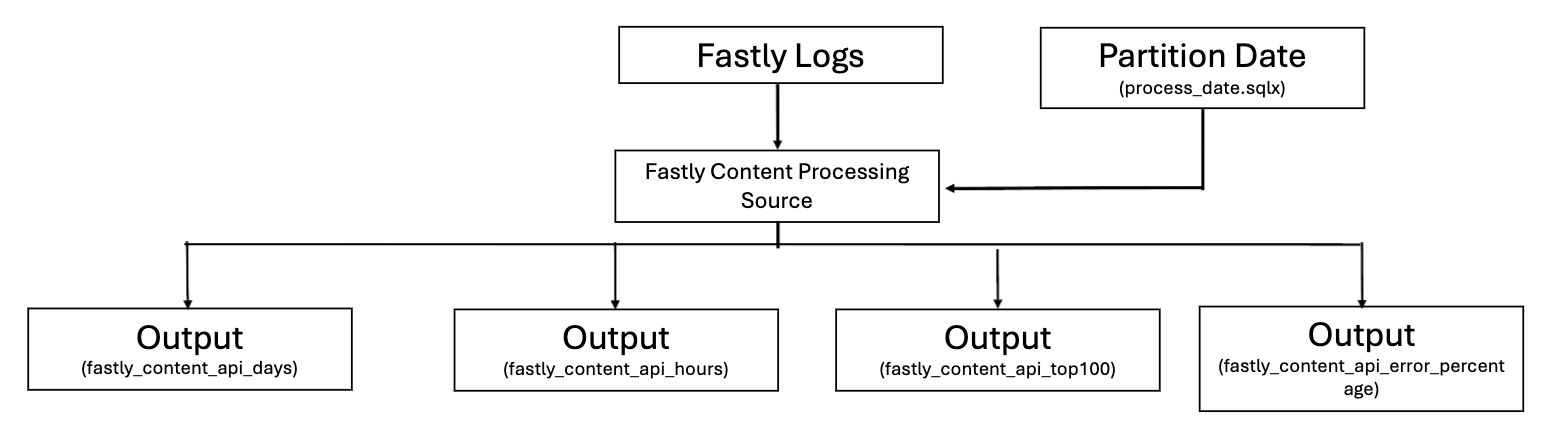
Step 1
The Dataform workflow sits within the gds-bq-processing project under the workspace name fastly_processing. It begins by defining the raw web logs data as a source file - fastly_logs.sqlx.
Step 2 - Initial Processing
The most recent partition_date not already present in fastly_bot_processing_final is selected from fastly_logs.
Initial processing is performed in fastly_processing_content_api_source.sqlx. All records from fastly_logs are selected and filtered using _PARTITIONTIME from the process_partition table created by process_date.sqlx, ensuring that only the most recent unprocessed partition is selected.
To protect user privacy, activity is identified using md5_hashed_value, an anonymised identifier created by hashing a combination of the user’s IP address and user agent. This enables user-level behavioural analysis while preventing access to the original identifying values contained within the raw web log data.
Additionally, the query applies three filters to return only successful web page loads, these filters are:
- Method of GET
- Payload size greater than 0 bytes
- Content type of json
The resulting dataset is stored as gds-bq-processing.fastly_processing.fastly_content_api_processing.
Step 3 - Outputs
There are four outputs from the content traffic branch of the Dataform workflow which are all stored in gds-bq-data.govuk_weblogs:
-
fastly_content_api_days: This table contains the total number of requests grouped by
partition_date,dayandapi -
fastly_content_api_hour: This table contains the total number of requests grouped by
partition_date,hourandapi -
fastly_content_api_top100: This table contains the top 100 most requested endpoints grouped by
partition_date,apiandurl -
fastly_content_api_error_percentage: This table contains the total number of requests, successful, failed and error percentage, grouped by
partition_dateandapi